9 ways to cut your AI bill before you switch models (with prompts and a checklist)
The short version
If your AI bill keeps going up, the model is rarely the problem. The path each request takes is. Most apps send every request to the biggest model, with the whole chat history attached, and ask for a long answer. Each of those three habits has a fix that costs nothing to try.
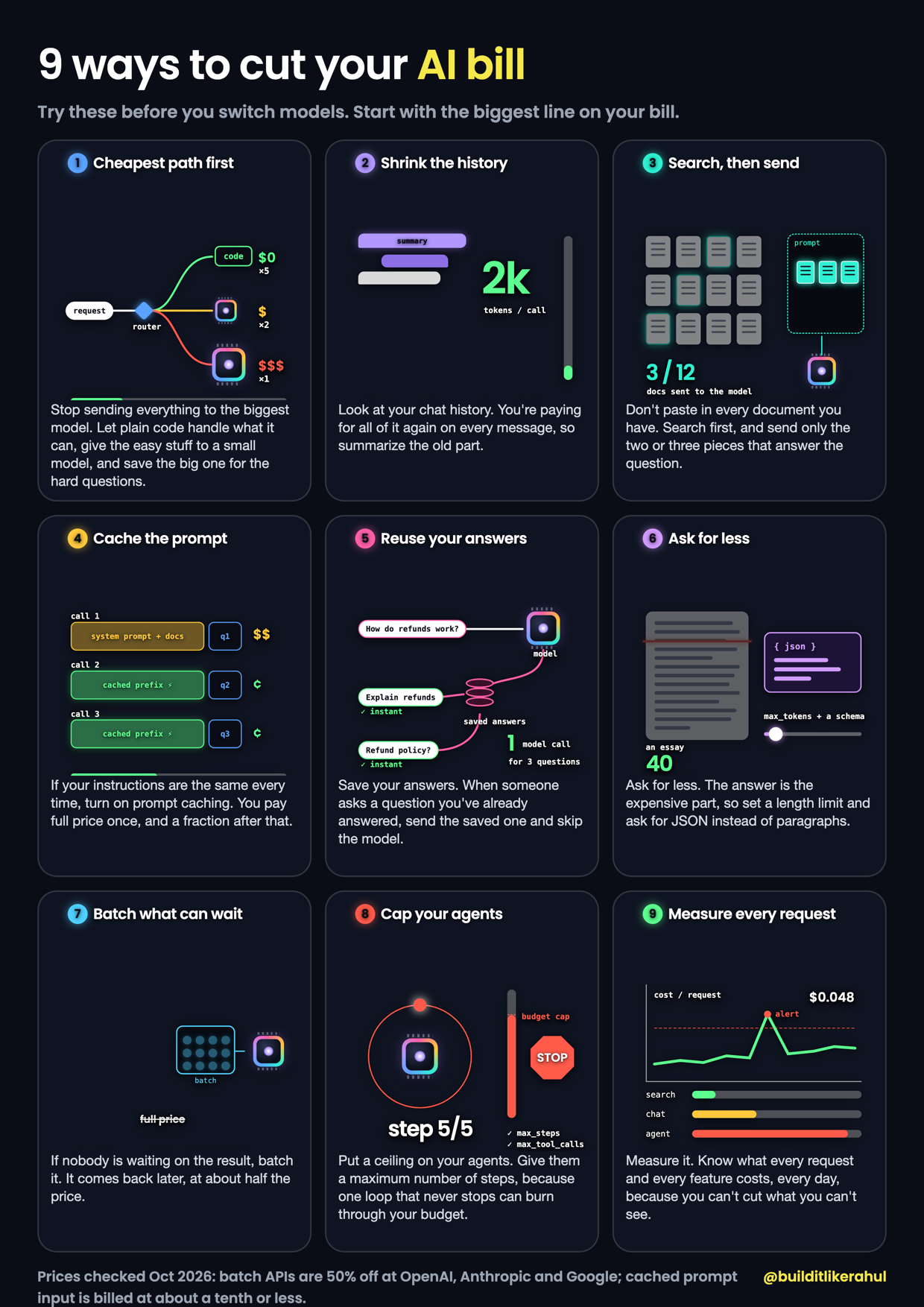
Below are nine fixes, in the order I would try them. For each one: what it is, when it applies, how to do it, and the mistake to avoid. Start with whichever one is the biggest line on your own bill, not with number one.
Copy these prompts
Paste them into Claude Code, Codex or Cursor inside your project, in this order.
1. Find where the money goes
Audit every place this project calls an LLM. Report before changing anything.
For each call site, give me one row: file and function, which model, roughly how many tokens go in, roughly how many come out, how often it runs, and whether the prompt starts with the same text every time.
Sort the rows by estimated cost per day, highest first. Mark anything you had to guess as GUESS.
2. Pick the cheapest fix for the top three rows
For the three most expensive call sites, tell me which of these applies and why: route to a smaller model, shorten the history, retrieve less, cache the prompt prefix, cache the answer, cap the output, move it to a batch job, or add a step limit.
One recommendation per call site. Include the risk: what could get worse if we do it.
Do not change any code yet.
3. Make one change and prove it
Apply only the first recommendation. Before you do, record the current cost per request for that call site (tokens in, tokens out, model price).
After the change, run the same five real inputs through it and show me cost per request before and after, and whether the answers are still correct.
If the answers got worse, undo the change and say so.
1. Cheapest path first
What it is. Not every request needs the biggest model. Some need no model at all. Send each request down the cheapest path that can still do the job: plain code first, a small model next, the big model only for the hard ones.
How to do it.
- List the kinds of request your app handles. Five to ten kinds is normal.
- For each kind, ask: could a rule, a lookup or a regular expression answer this? If yes, do that and skip the model.
- For the rest, try the small model on twenty real examples. Keep the small model wherever it gets them right.
- Send only what is left to the big model. Add a fallback: if the small model fails a check, retry once on the big one.
Mistake to avoid. Routing by guesswork. Test on your own examples, because a cheap model that needs three tries is not cheap.
2. Shrink the history
What it is. A chat app sends the whole conversation again with every new message. Message twenty pays for messages one to nineteen. The bill grows with the square of the conversation length, not with its length.
How to do it.
- Keep the last few turns word for word. Four to six is a reasonable start.
- Replace everything older with a short summary, and update that summary every few turns.
- Drop tool results and pasted files from old turns once they have been used.
Mistake to avoid. Summarizing away a fact the user will ask about later. Keep names, numbers and decisions in the summary on purpose.
3. Search, then send
What it is. Do not paste every document into the prompt. Search your documents first, and send only the two or three pieces that answer the question. This is what people mean by retrieval, or RAG.
How to do it.
- Split your documents into small pieces, a few paragraphs each.
- For each question, find the best matching pieces. A plain keyword search is a fine first version.
- Send the top three, with their titles, and tell the model to answer only from them.
Mistake to avoid. Sending twenty pieces "to be safe". More context costs more and often makes the answer worse.
4. Cache the prompt
What it is. If your prompt starts with the same long instructions every time, the provider can remember that part. You pay full price once, and a fraction for it after that.
What the providers say. Anthropic bills cache reads at about a tenth of the normal input price, with a small extra charge the first time the cache is written (prompt caching docs). OpenAI applies caching automatically and describes cached input as discounted by up to 95% depending on the model (prompt caching guide). Google offers context caching on Gemini (pricing).
How to do it.
- Put everything that never changes at the very top: system instructions, tool definitions, reference documents.
- Put everything that changes at the bottom: the user's question, today's date, the retrieved pieces.
- On Anthropic, mark the end of the fixed part with
cache_control. On OpenAI, nothing to mark, but the fixed part must be long enough to qualify. - Check the usage numbers in the response. You should see cached tokens reported from the second call on.
Mistake to avoid. A timestamp or a user name near the top of the prompt. One changing character at the start means nothing after it is cached.
5. Reuse your answers
What it is. When someone asks a question you have already answered, send the saved answer and skip the model completely. The cheapest request is the one you never make.
How to do it.
- Start with exact matches. Tidy the question (lower case, trimmed), use it as a key, and store the answer with an expiry time.
- Then match questions that mean the same thing. Compare embeddings, and only reuse an answer when the match is very close.
- Never reuse an answer that depends on the user's own data, or on something that changes during the day.
Mistake to avoid. Setting the similarity bar too low. "Cancel my order" and "cancel my subscription" look alike and need different answers.
6. Ask for less
What it is. The answer is the expensive part. On the price pages, output tokens cost several times more than input tokens. On OpenAI's table and Anthropic's table it is commonly five times or more. So a long answer hurts more than a long question.
How to do it.
- Set a maximum output length on every call. Pick it from what the feature needs, not from the default.
- When code will read the answer, ask for JSON with a fixed set of fields. No greeting, no explanation.
- When a person will read it, say how long it should be: "two sentences", "five bullets".
Mistake to avoid. A limit so tight that the answer is cut off in the middle. Check for the "stopped because of length" signal and raise the limit where it fires.
7. Batch what can wait
What it is. If nobody is waiting on the result, send the work as a batch. It comes back later, at half the price.
What the providers say. All three say the same number. Anthropic: cutting costs by 50% (batch processing). OpenAI: 50% lower costs, with a 24 hour turnaround (Batch API). Google: 50% of the standard cost (Gemini Batch API).
How to do it.
- List the jobs that run in the background: nightly summaries, tagging, evaluations, data clean up, bulk imports.
- Move those to the provider's batch endpoint. You upload the requests, then collect the results when they are ready.
- Keep anything a user is watching on the normal endpoint.
Mistake to avoid. Batching something a user is waiting for. Results usually arrive well within the day, but there is no promise of minutes.
8. Cap your agents
What it is. An agent calls the model in a loop, and each step re-sends everything before it. One loop that never stops can burn through your budget in an afternoon. Give every agent a ceiling.
How to do it.
- Set a maximum number of steps per task. When it is reached, stop and return what you have.
- Set a maximum number of tool calls, and a maximum token budget for the whole run.
- Add a timeout.
- Log every run that hits a limit. Those runs tell you where the agent gets stuck.
Mistake to avoid. Raising the limit every time it is hit. A run that needs fifty steps usually has a prompt or a tool problem, not a limit problem.
9. Measure every request
What it is. You cannot cut what you cannot see. Know what every request and every feature costs, every day.
How to do it.
- On every call, record: the feature it belongs to, the model, tokens in, tokens out, cached tokens, and the cost worked out from the price table.
- Add them up per feature per day. One table is enough to start.
- Set an alert for a day that costs more than twice the usual.
- Look at the table once a week and fix the top row.
Mistake to avoid. Tracking only the monthly total. A total tells you that you have a problem. A per feature number tells you where.
Which one first
- One long prompt on every call: start with 4, cache the prompt.
- Long conversations: start with 2, shrink the history.
- Lots of documents in the prompt: start with 3, search then send.
- Background jobs: start with 7, batch what can wait.
- Agents: start with 8, cap them, then 1.
- You do not know: start with 9. Measure for a week, then come back to this list.
Steal this for your app
- Fix the path before you change the model.
- Fixed text at the top of the prompt, changing text at the bottom.
- Every call has a maximum output length.
- Every agent has a maximum number of steps.
- Anything nobody is waiting on goes in a batch.
- Cost is recorded per feature, per day.
A note on the numbers
The prices and discounts above were checked on the providers' own pages in October 2026. They change often, so open the linked page for the model you use before you plan a budget around them.