The AI app map (all 8 parts, and what to build each one with)
The short version
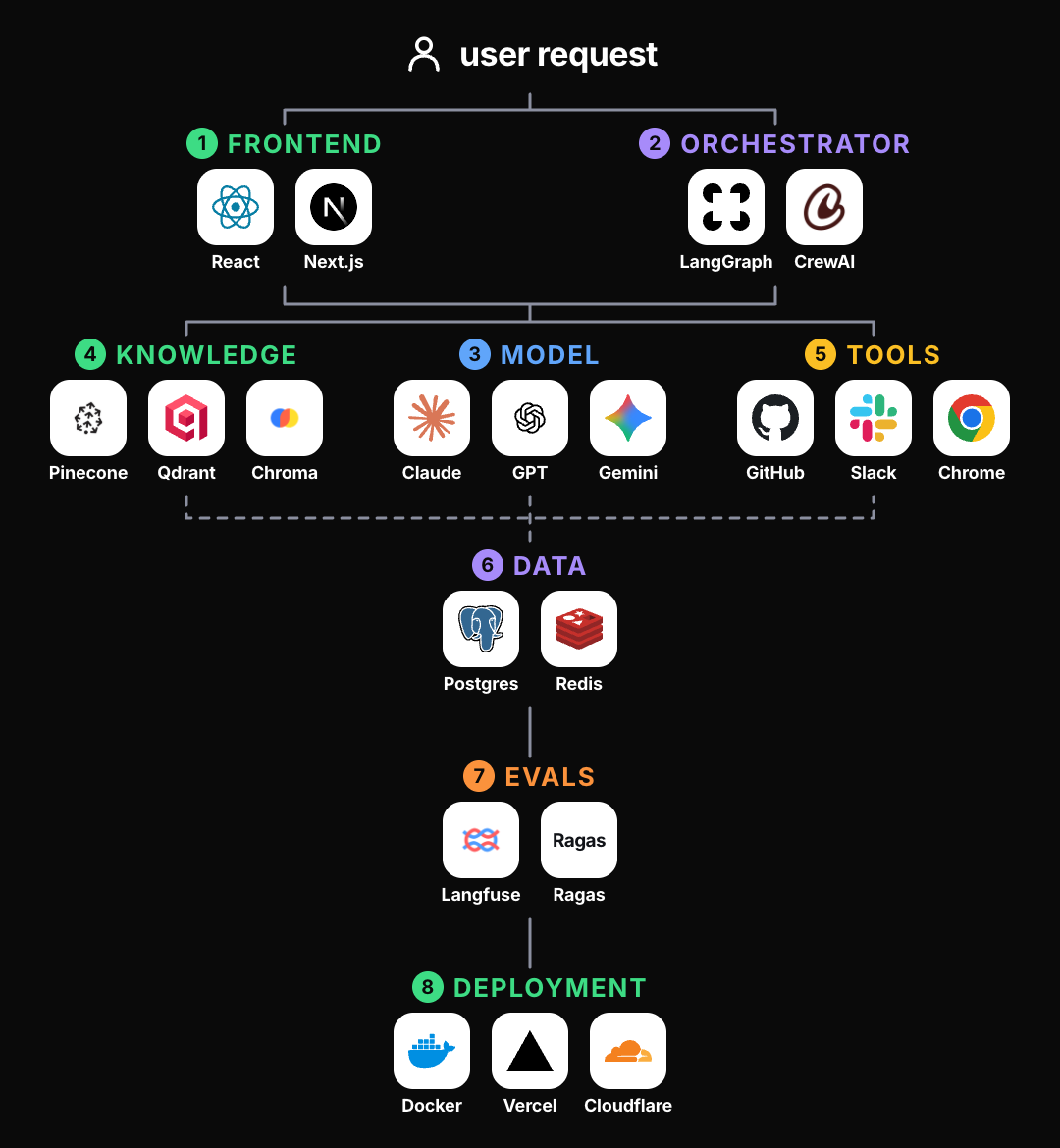
Every AI app you use is made of the same eight parts. The model, the bit everyone talks about, is only one of them. The other seven are why one app feels like a product and another feels like a demo that forgets what you said.
This is the full map from the reel: what each part does in plain words, the tools people actually use for it, and three prompts that tell you which parts your own app is missing.
Copy these prompts
Paste them into Claude Code (or any AI that can see your project), in this order. The first one tells you where you stand, the next two fix the gaps most people have.
1. Find which of the 8 parts you actually have
Look at my project and map it against these eight parts of an AI app: frontend, orchestrator, model, knowledge, tools, data, evals, deployment. For each part, tell me in one line whether I have it, what I am using for it, and where it lives in the code. Then tell me which missing part is hurting the product most right now, and why.
2. Give it knowledge, so it stops guessing
My AI feature answers from the model's memory alone. Show me the smallest way to let it look things up in my own documents first: what to store, where to store it, and how the answer should cite what it found. Keep it to one afternoon of work and tell me how I will know it is working.
3. Add one eval before you change anything else
Write me ten real questions a user would ask my AI feature, each with what a good answer must contain. Then set up a way to run all ten against the current version and score them, so that the next time I change a prompt or a model I can see whether it got better or worse.
The eight parts
Read them in this order. It is the order a request travels.
1. Frontend: the part you see
The screen, the chat box, the button. It takes what the user typed and shows what comes back, ideally as it streams in so the wait feels short.
Common picks: React, Next.js. For an internal tool, Streamlit gets you a screen in an hour.
2. Orchestrator: decides what happens next
This is the manager. It takes the request and decides the steps: look something up, call a tool, ask the model, check the answer, try again. A single model call has no orchestrator. An agent is mostly orchestrator.
Common picks: LangGraph, CrewAI, Mastra. Plain code with a loop is a valid choice, and often the right first one.
3. Model: the brain
The model reads the request and writes the answer. It is the part that feels like magic and the part that is easiest to swap.
Common picks: Claude, GPT, Gemini, or an open model such as Llama when you need to run it yourself.
4. Knowledge: lets it look things up
A model only knows what it was trained on. Knowledge is your documents, stored so the app can find the three paragraphs that matter and hand them to the model with the question. This is what people mean by RAG.
Common picks for the store: Pinecone, Qdrant, Chroma, Weaviate. If you already run Postgres, its vector extension is enough to start.
5. Tools: how it actually does things
Without tools a model can only talk. Tools let it act: open a pull request, send a message, read a web page, call your own API. MCP is the common plug that lets one tool work across many AI apps.
Common picks: GitHub, Slack, a browser, and your own APIs, connected through MCP.
6. Data: where it remembers
Users, conversations, files, and anything that has to still be there tomorrow. This part is ordinary software, and that is the point: it should be boring.
Common picks: Postgres for records, Redis for speed, object storage such as S3 for files.
7. Evals: how you know it is not lying
A normal test checks that code returns the right value. An eval checks that an answer is good: correct, grounded in what it looked up, and not made up. Without evals every prompt change is a guess.
Common picks: Langfuse, Ragas, Phoenix, TruLens. Ten questions in a spreadsheet beats having nothing.
8. Deployment: ships it
Where it runs and how a new version gets there without breaking the old one.
Common picks: Docker, Vercel, Cloudflare, and Kubernetes once one machine is no longer enough.
Where most projects stop
Most first AI apps are parts 1 and 3: a screen and a model call. That is a demo, and it is a fine place to start.
The usual order to add the rest:
- Data, the moment a second user shows up or anyone wants yesterday's conversation back.
- Knowledge, the first time the model confidently answers something about your product that is wrong.
- Evals, before the second prompt change, so you can tell better from different.
- Tools, when users ask it to do the thing instead of describing the thing.
- An orchestrator, when one request needs more than one step.
You do not need all eight on day one. You do need to know which ones you skipped, because each one you skip shows up later as a specific complaint.
| What users say | The part that is missing |
|---|---|
| "It made that up." | Knowledge, and evals to catch it |
| "It forgot what I told it." | Data |
| "It told me how, but did not do it." | Tools |
| "It got worse after the update." | Evals |
| "It is slow, then it times out." | Deployment, and sometimes the orchestrator doing too many steps |
Steal this for your app
- Draw your own version of the map with only the boxes you really have. The empty boxes are your roadmap.
- Pick one tool per part and stop comparing. Every name above is good enough to ship with.
- Keep the model swappable. Put the model call behind one function so changing models is a one line change.
- Add the eval before the feature. Ten questions now saves you from arguing about whether the new prompt is better.
Run this on your codebase
Audit my project as an AI application. For each of the eight parts (frontend, orchestrator, model, knowledge, tools, data, evals, deployment), tell me what I have, how solid it is on a scale of 1 to 5, and the single most likely way it fails with real users. Finish with the one part I should build or fix next, the smallest version of it worth shipping, and how I will know it worked.